المكتب: رقم 17، مجمع رونجوي للتكنولوجيا الصناعية بمجمع رونجوي للتكنولوجيا طريق كيوان الثالث، شوندي، فوشان، قوانغدونغ، جمهورية الصين الشعبية

بي-تك آسيا المحدودة
شكراً لك على رسالتك.
شكراً لك على رسالتك.
Programming a hotel door lock and key card sets the lock, room, card, and access information needed before a guest card can work. The process is used to set authorization, limit staff access rights, and control the valid staying time of guest cards.
This guide covers programming through a PC management system and a mobile app, including hotel registration, gateway or device setup, room list setup, and issuing a key card with a valid time. For related systems and locks, see النظام والبرمجيات, أقفال الفنادق الإلكترونية, and BE-TECH Wireless Online Electronic Lock.
Programming hotel door lock and a key card is the crucial procedure to set the validation
Programming a hotel door lock and a key card is the crucial procedure to set the authorization. You can limit the access right of the hotel staff and the staying time of guests by programming the hotel door lock and key card.
To successfully program the hotel electronic door lock, you need to follow these steps.
● PC Management System
1. Turn on the DMS Protector
2. Software Login
3. Open the URL using Google Chrome: https://dms.dmsiot.com
4. Connect the card issuer and run the DMS card service in the background; click the list item on the left to select the current hotel and register the authorization card.
● APP on Mobile Phone
1. Register an account and Log in
After entering the user’s email, Pin-code, and verification code, click Register to register the user.
Enter your username and Pin-code to log in.
2. Registered hotel
Click on the user’s avatar to enter the menu bar, and click on Register Hotel to register
3. Add Gateway
Each gateway has a QR code that can be added by clicking on the QR code. After all the devices are completed, you can view the online status in the gateway list.
4. Add Device
Please swipe the authorization card in the door lock sensing area. (#button flashes in green light)
Please get the smart lock information on the mobile phone drop-down screen.
If you use a mobile phone, you need to do this step to finish the programming process. Enter the home page and set the information such as the building, floor, room number, and other information.
In this section, the author would illustrate how to program the hotel door lock the key card in the PC software and the mobile phone APP.
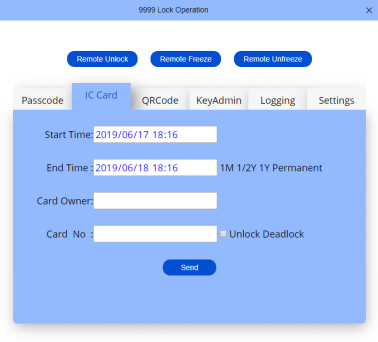
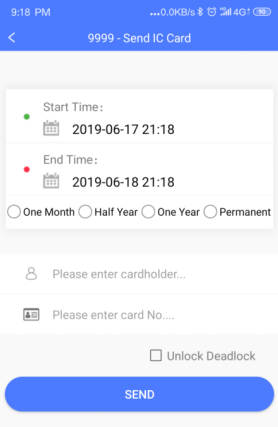
Select the start time and end time of the card number, access the card issuer, and place the card on the card reader. The card number field will display the card number of the card. After clicking Send, you can unlock the corresponding door lock with the card.
Step 1: Select An NFC-Enabled Mobile Phone
Use the NFC-enabled mobile phone for card number reading. You can send an IC card by filling in the valid time.
Tips: Modify the Information in the Hotel Door Lock Key Card
When you need to modify the validity period of the IC card, click the specific card number to enter the modification interface, and you can modify the card validity period.
In this section, the author would answer a series of frequently asked questions about hotel door lock, to let you get a further understanding about the electronic hotel room door locks.
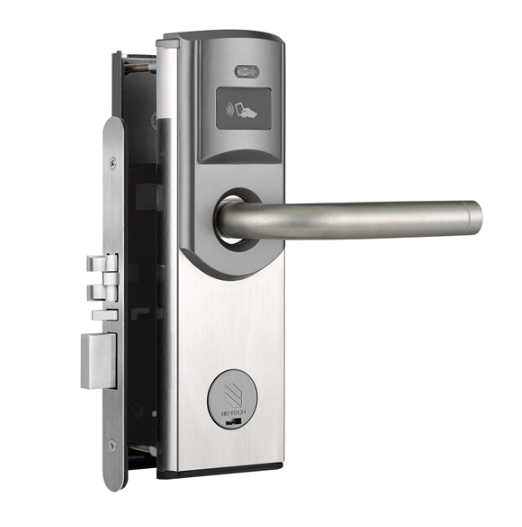
The hotel electronic door lock is designed with actuators that control the bolt of the door to achieve the locking and unlocking of the hotel electronic door lock.
The hotel electronic door lock can be wired or wireless. Then, supported by communicating technology, the hotel electronic door lock is able to contact the electronic hotel door lock system.
In Be-Tech, our hotel electronic door locks are powered by 4 AA alkaline batteries.
All in all, electronic hotel door locks are highly efficient in any use. Cooperating with the intelligent electronic door lock management system, the electronic hotel door locks would make your hotel management works easier and more organized. The author hopes this post could help you get a further understanding of the use of hotel electronic door locks.
Programming sets the authorization needed for the lock and key card to work together for the correct room and valid time.
Yes. The page describes a PC management system process, including software login, card issuer connection, hotel selection, and authorization card registration.
Yes. The page describes mobile app steps such as account registration, hotel registration, gateway setup, device adding, and room list setup.
The user selects the card validity time, connects the card issuer or uses an NFC-enabled phone, and sends the card data so the card can unlock the corresponding door lock.